
AI Meeting Summary & Desktop Control | Instant Answers Without Prompting | Build Shortcuts by Voice | Personalized Screen & Emoji
Check on Kickstarter

Thank you, guys! We’ve crushed our $100k funding goal!Let’s keep moving!
Help us reach the next milestone, and we’ll add a FREE USB-C to HDMI Adapter to every pledge. Perfect for seamless connectivity with your devices!


Meet Quake — A New Kind of Desktop AI
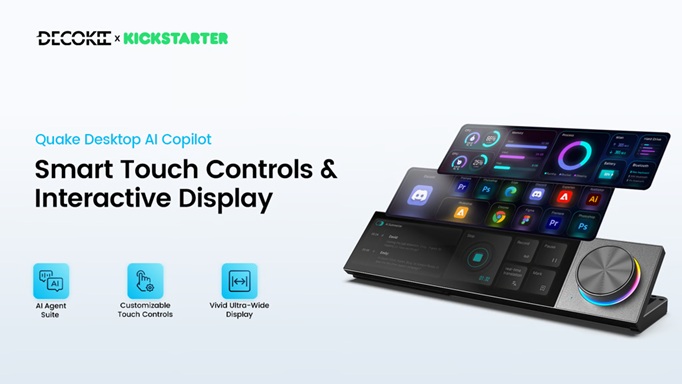
Quake is the world’s first AI-first desktop terminal that unifies
AI meetings, instant answers, shortcut control, and visual interaction into one always-on screen.
It doesn’t just display information.
It listens, understands, and executes — for work, creation, and play.
Not a macro pad.
Not a dock.
Not a secondary screen.
Quake is all three — powered by AI.

Does your desktop workflow feel harder than it should be?
Meetings end, but key points slip away without clear summaries.
Language barriers slow you down in global calls and videos.
Powerful software, yet you’re constantly searching for shortcuts.
AI can help — but only after long prompts and repeated corrections.
Too many tools. Too much setup. Still not enough clarity.

AI shouldn’t need constant explaining — or deliver inconsistent results.
With role-based AI and focused instructions, Quake delivers clear, reliable outcomes every time.
More than a secondary display, it’s an always-on desktop AI hub that coordinates your software and hardware seamlessly.


Quake is designed for professionals, content creators, desk setup enthusiasts, and gamers. It maximizes productivity and enables efficient AI interaction through high-density, multi-format information shortcuts. Powered by AI, it becomes your intuitive and capable smart assistant. Its sleek form factor combines an 8.8-inch IPS screen with a metallic control knob. Crafted from full metal with CNC precision machining and enhanced by customizable RGB lighting, Quake stands out as the most eye-catching centerpiece for your desk. It seamlessly blends user-centric design with a sci-fi aesthetic, transforming your desktop into an intelligent, efficient, and dynamic space for both work and play.


Quake turns OpenClaw into a desk-ready assistant you can actually use every day. Just speak naturally—Quake captures your intent, shows the plan, and lets you run your favorite OpenClaw tasks with one tap. Save those tasks as reusable routines, trigger them again anytime, and keep your workflow simple.
OpenClaw does the work. Quake makes it effortless.

Quake comes pre-configured with shortcuts for popular apps and professional tools—like Photoshop, Premiere Pro, and Office—so you can launch anything instantly. You can also use AI to build custom shortcuts and workflows for any software you use. With the side knob, quickly toggle between functions and settings, making every interaction intuitive and your workflow seamless.

Hold the side knob and speak to instantly create AI-generated wallpapers and videos.

Images and videos automatically adapt to the ultra-wide screen for a perfect fit.


Hold the side knob, speak to the AI, and it will intelligently generate custom shortcut sets for your frequently used software like Photoshop and Office.


Plus, use Quake to create your own custom emoji, ready to use across your favorite chat apps.


True intelligence works behind the scenes—so you can see the results front and center. It moves you from reacting to predicting, from switching screens to commanding one, from doing busywork to doing meaningful work. Your workflow flows. You create. That’s all.


No more manual note-taking. As soon as your meeting ends, AI auto-generates a structured summary. Pick from 10 templates and share key points with your team — effortlessly.


Working with global teams or watching foreign videos?
Language is no longer a barrier. Turn on Translate Mode for real-time captions and translation across 17 languages — making cross-language communication as seamless as speaking your own.

Need to step away mid-meeting? Don’t worry about missing important points.
With one tap on [Record], the rest of the meeting will be fully captured. Once you return, tap again — and in seconds, AI will deliver a clear summary and full transcript, ready to export in multiple formats. Never miss, always review, easily share.

During a meeting, simply click [Mark] to highlight key information. After the meeting ends, the system automatically extracts all your highlights and intelligently generates a clear summary of the key points—so what matters is always clear at a glance.

Tired of scrambling for the mute button in Zoom, Teams, or any meeting app?
Forget switching and clicking. With its independent systemlevel audio control, a single tap on the [Mic Mute] instantly mutes your microphone globally—across all platforms and apps. No compatibility limits, no boundaries. Stay in control of your voice, anytime, anywhere.


Over 100 specialized AI assistants are ready to help, delivering accurate, concise answers anytime. No need to search elsewhere—just one tap solves everything from daily queries to expert fields like math and law.

Match an AI to your task. Configure different roles for on-demand, professional advice.

Why alt-tab to mute, switch channels, or check messages?
With Quake’s always-on overlay, control every Discord function directly over your game. No leaving your screen. No breaking your flow. All the interaction stays at your fingertips—so you stay immersed and your gameplay never skips a beat.

Computer often lagging? The Quake monitor shows real-time stats like CPU, memory, and network—so you can pinpoint issues instantly. Always know how your system is running. Game, work, and create with confidence and smooth performance.


Quake easily integrates with your smart home ecosystem. By linking with Home Assistant (API setup required), you can adjust lights, turn off AC, and more with one tap on the touchscreen—change your environment at will.


Want the look and feel of a vinyl player on your desk? Quake brings it to you. Lose yourself in every note—and enjoy music, moment by moment.

PS: You can either import your local audio files or connect your Spotify account to play your playlists directly through Quake.


