
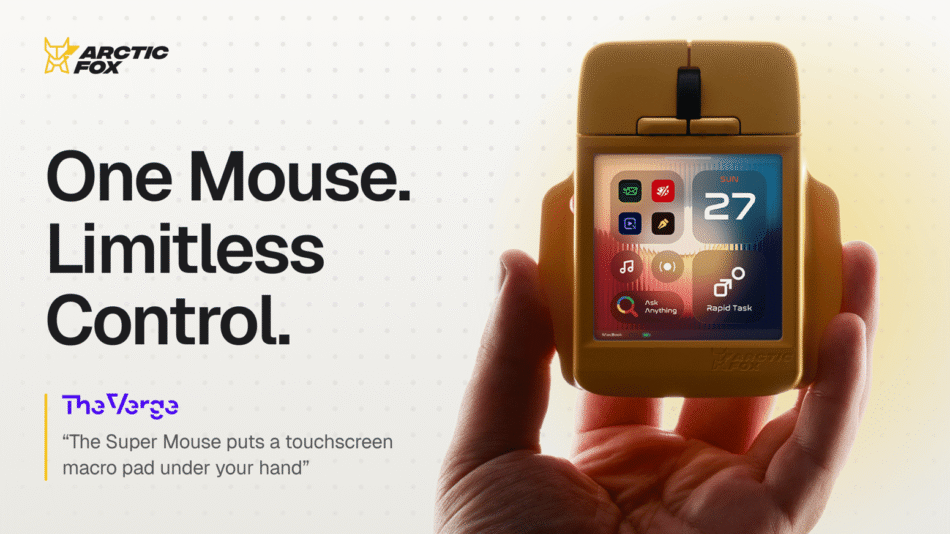
Take your productivity further. Run shortcuts and workflows, launch apps, and dictate text, all from a mouse with a touchscreen.
Check on Kickstarter


Super Mouse makes it possible with a built-in 3.1" touchscreen. It shows the shortcuts and controls for the app you're using, and switches them automatically when you change apps.
Launch apps with a tap. Run your favorite shortcuts. Fire off entire workflows. Dictate instead of typing. All right from your mouse.
Spend less time searching through menus. More time getting work done.
⚡| One Touchscreen. Full Control


Super Mouse features a 3.1" touchscreen that gives you a faster way to get things done. Turn your everyday actions into one-touch shortcuts. Launch your favorite apps. Switch tools. Run the commands you use most. All with a simple tap.
And you're in control of what goes on the screen. Choose the shortcuts you want for each app, arrange them the way you like, and Super Mouse automatically brings up the right ones as you switch between apps.
No more hunting through menus or remembering complicated keyboard shortcuts. You get the controls you need, right under your fingers.


Why reach for your keyboard every time you need to type?
Super Mouse gives you 2 easy ways to enter text, right from your mouse.

Speak instead of typing. Dictate emails, messages, or longer text in 90+ languages. Just speak, and watch your words appear on your screen. Everything is processed locally on your computer for privacy.

Swipe to type. Need to write something quickly? Slide your finger across the touchscreen keyboard to form words, just like you do on your phone.
🚀| Hyper Keys


Press one button instead of going through multiple steps.
Super Mouse comes with customizable physical Hyper Keys that let you trigger your favorite shortcuts and even entire workflows with a single press.
Need to open multiple apps, run a series of commands, or repeat the same steps throughout your workday? Set up a Hyper Key to do it all with one press.


Double-tap, and Super Mouse becomes a multi-touch trackpad.
Switch to trackpad mode and use familiar finger gestures to scroll, swipe, and zoom.

Go further with custom gestures. Draw a circle on the touchscreen to undo your last action, or a triangle to save your work. You can even create your own gestures for the commands you use most.
🔧| Customize with the Flow App


Flow is the desktop app for Windows and macOS where you set up and customize Super Mouse.
Choose which shortcuts appear on your touchscreen, assign functions to your Hyper Keys, and customize your gesture controls. You can even create different layouts for the apps you use.
Super Mouse then detects which app you're using and automatically shows the controls you've set for it.


Super Mouse feels just like a regular mouse, even with a built-in touchscreen.
Its design keeps your palm away from the screen, while built-in accidental touch detection prevents unwanted inputs when you're holding the mouse. And at just 95 grams, it's lightweight and comfortable for everyday use.


Go beyond clicks and touchscreen controls.
Super Mouse uses built-in motion sensors to turn tilting and twisting movements into arrow-key controls, making it easier to navigate and control movement in games without reaching for your keyboard.
🔄| Multiple Profiles


Create and save different profiles for work, gaming, or editing, each with its own shortcuts and controls.
Switch between profiles instantly, and let Super Mouse automatically adjust its controls based on the one you're using.


Hi, I'm Sridhar, founder of Arctic Fox Technologies.
Our team has years of experience designing, developing, and manufacturing computer mice. We've learned what makes a mouse comfortable, reliable, and easy to use every day.
We've always believed a mouse could do more. Technology has come a long way, yet the everyday mouse hasn't changed much. So, we set out to build on everything we've learned and create something that gives people more control over their work, without sacrificing the familiar feel of a regular mouse.
That's how Super Mouse came to life.
Now, with your support on Kickstarter, we're excited to bring Super Mouse to your desk.
— Sridhar, Founder of Arctic Fox Technologies
📦| What's In The Box


