
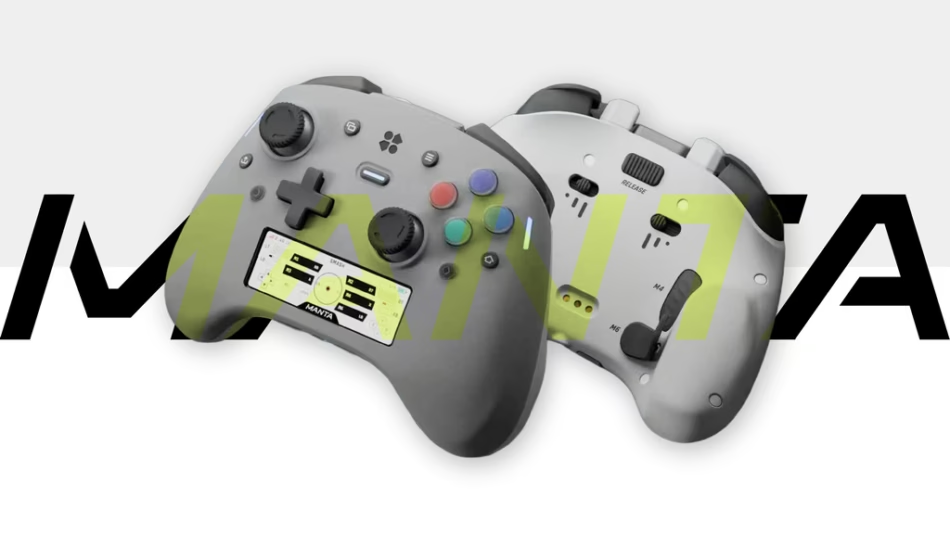
A deeply tunable controller with MantaOS built in, analog Pulse Buttons, adjustable TMR sticks, TriStage Triggers and Maglev Haptics.
Check on Kickstarter


Manta brings together the things we have always wanted from a modern controller: a shape developed around the hands, performance hardware built without compromise, and controls that adapt to the way you play.
At its center is MantaOS, running directly on the built-in color display. Profiles, tuning, connections, macros and custom apps live on the controller instead of inside another phone or desktop program. Serious performance. Unexpected possibilities.


Try out the latest Manta prototype at Tokyo Game Show. Come hold it, tune it, and play it for yourself, then share your feedback as we make the final refinements.


Most of Manta’s hardware cost lives inside the Beast. We refused to cut corners here. It is, frankly, a spec monster to make Manta feel immediate, precise, and entirely tunable to the player holding it. Every part of the Beast was designed to be felt, tuned, tested, and ultimately measured.
Analog Pulse Buttons

Most face buttons create an input only when they reach a fixed electrical contact. Our unique Pulse Buttons track the full travel of all four ABXY/BAYX buttons without one, allowing the input to fire before the button bottoms out.

Less finger travel before actuation and reset means less time between your reaction and the game. Even 8,000 Hz polling can report only an input that already exists. Pulse Buttons work on the part before that, while your finger is still moving. The button still bottoms out physically; the input doesn’t have to wait for it.
Tune the actuation and rapid-reset points of each button independently. An aggressive setting fires and re-arms with very little movement; a deeper one asks for a deliberate press. A bonus of this mechanism is that there are no electrical switch contacts to wear or debounce so they’ll last longer than other controllers.

Float-Tension Adjustable TMR

Tune both sides of the stick: how it feels under your thumb and how it behaves in-game. Set either stick light for quick movement, firm for steadier control, or differently on each side. Adjustment takes a deliberate twist – no tools, disassembly or stick swapping -and will not shift during normal play. Contactless TMR sensing avoids the resistive track responsible for much wear-related drift, while the internal silicone ring lets the stem glide around the shell instead of crashing and scraping against it.
MantaOS adds per-stick dead zones and response curves, while compatibility with KontrolFreek Performance Thumbsticks gives you more options for height, grip and leverage.
TriStage Triggers
Three Trigger Modes. One Physical Switch.


Connectivity & Polling
Three Ways to Connect

MantaOS shows the active connection and available polling rates. For wired tournaments, the USB-C retention system locks the cable in place. Polling rate isn’t the same as latency, so we’ll publish complete response measurements too.
Designed for Switch and Switch 2, Too

Manta has dedicated Switch and Switch 2 modes. HOME wakes a paired Switch 2, the KBM button becomes the C Button for GameChat and the screen follows the BAYX layout. Native motion works in supported games, while supported HD Rumble 2 effects play through Manta’s LMR motors.
Maglev Haptics

Controllers typically have motors that go up and down along the grip. Our Maglev Haptics has two motors, aimed into your hands. One independently driven motor sits in each grip, rotated so its primary force moves into your palms. The sides can fire separately or together, and their range reaches into audible effects that use the shell as a sounding surface. Tune strength, frequency response and force curve in MantaOS.

Traditional rumble often feels like the same buzz turned up or down. Manta’s wideband LMR uses a voice coil to drive a magnetically suspended internal ram, producing a short knock, clean pulse, sustained vibration or several frequencies at once. It starts quickly and stops cleanly, so a hit arrives as one distinct moment.

Gyroscope, Accelerometer, Compass
Manta’s nine-axis IMU combines a gyroscope, accelerometer and compass. Use native motion in supported Switch games, map gyro to either stick or hold KBM to use the controller as a mouse. Any button can engage gyro aim, with separate sensitivity and axis settings.


At every milestone, current backers will receive a campaign update with the next vote. The winning upgrade joins Manta’s development plan, and the remaining choices can return in later rounds.
More branches are under evaluation.We are also validating additional ideas, including legacy controller modes, audio-derived rumble, expanded status-light behaviors and optional grip-surface accessories. These are not part of the active voting pool yet. We may add new branches as their feasibility, cost and schedule become clear.

Manta’s silhouette is impossible to mistake for another controller. Some people love it at first sight; others need to hold it before the form makes sense. Manta was shaped around the way hands approach, wrap, rest, and move – its grips, control clusters, surface transitions, and internal layout were developed together.

The sticks, buttons, D-pad and dedicated Macro Record and On-the-Fly KBM controls are arranged for comfortable reach, with customizable light bars providing quick status at the edges. The power button also glows in different color to indicate connection type.

The 2.79-inch display sits low between the grips for a reason. Controllers naturally tilt away from you as you play, so placing the screen lower brings it closer and makes it easier to read – while keeping it out of the way of your controls and the game itself.
Switch between a familiar Traditional D-pad and a broader Satellite Dish design. Both use the same underlying mechanism, giving your thumb two different shapes without changing the response. We’re making sure it passes the Contra test – and that it’s Hadoukenable.

Your index finger settles at the junction of the shoulder button, trigger and programmable shoulder control. Each input is a small lean away, and the high-pivot trigger follows the direction your finger naturally curls. The removable cap on top lets you swap it for a secure cable-lock for serious sessions.


Two integrated rear buttons and two removable paddles put four additional buttons under the fingers already holding the grips. Both paddle sizes come in the box; mix them or remove them entirely. The trigger adjustments toggle how the trigger buttons limit how far the button physically moves.
A controller can look reasonable on a scale and still feel tiring if its mass pulls forward. Manta feels premium with it’s current weight at ~315g (similar to that of the DualSense Edge, and lighter than the Xbox Elite Series 2), with two battery cells split across grips and positioned to place more mass toward the palms.


Built to Adapt
Most advanced controllers send you to a desktop app, a phone or a strange combination of held buttons and blinking LEDs. Manta puts connections, dashboards, profiles, tuning and macros on its own 2.79-inch display. You can see what the controller is doing while it is still in your hands.
MantaOS
The Controller’s Own Interface
MantaOS runs on the built-in color display. Change a profile, inspect a mapping, test an input or confirm a connection without reaching for another device.
Dashboards
The Screen While You Play.
The display doesn’t become dead space when the menu closes. Keep connection, polling rate and battery visible; mirror the controller, show your keymap, follow a macro or count inputs during a session. Each profile can use a different dashboard.
Pairing & Device History
Pairing Shouldn’t Be a Cheat Code
 Pairing a third-party controller is often needlessly annoying. Which buttons do you hold? What does that blinking light mean? MantaOS shows connection state and remembered devices on screen, where you can reconnect, rename or forget them.
On-the-Fly KBM
Transform into a Keyboard, Mouse, and Media Remote
You launch a game and nothing happens because a Windows prompt is hiding behind it. On a handheld PC or couch setup, one stupid dialog box can send you looking for a mouse.
Tap the On-the-Fly KBM button and the button glows blue. Manta becomes a real keyboard and mouse, with no companion app in between. Dismiss the interruption, type with Compass Quick Type or QWERTY, send a saved phrase from Quick Pad, then tap again to return to the gamepad. Hold the button for Gyro Mouse and media controls.


Macro Action Timeline
A Multitrack Recorder for Controller Inputs
A macro lets one button replay a recorded series of inputs. Macro Action Timeline turns that idea into a multitrack recorder built into Manta. Press the red Record button, perform the sequence and press again to see it as a visual timeline.

A conventional macro is a chain of buttons and delays. Manta records buttons, analog-stick paths, trigger pressure and pauses on separate tracks. Every event has its own position and duration.

Trim the recording, move an event in steps as fine as 2 ms, copy or delete an action, change the playback speed and set loop behavior. Name it, store it on Manta and assign it to one of the six extra controls.
Input Tuning
Every button and stick, tuned directly on Manta.

Tune face buttons, sticks, triggers, gyro aim, turbo, layout and KBM directly in the Inputs menu. Shared settings keep both sides consistent; per-input controls let them differ. Live graphs show the physical input beside the value Manta sends, and guided routines handle calibration:


Profiles

Manta stores up to eight profiles, each with its own dashboard, button map and tuning. Remap any input, assign macros, choose the gyro-aim button or add a second held or toggled layer.
Personalization & Preferences
Make Manta Yours
Choose a dark, light or blue interface, then set the accent color and light-ring pattern. Yes, there is a dark mode. MantaOS also holds screen, audio, microphone, haptics and charging preferences, plus firmware updates, storage information and Disk Mode for transferring apps.

Manta begins as a complete controller. Beyond is everything it can become after that: new apps, games, and experiences loaded through MantaOS, new ideas shared by creators, and new upgrade possibilities unlocked with the campaign community.
MantaOS Apps
A Controller That Can Learn New Tricks

Adding an app works like copying a file to a USB drive: connect Manta, enter Disk Mode, drag over a compatible app and launch it from MantaOS. The programmable layer uses a dual-core Raspberry Pi RP2350, 16 MB of storage and a 428×142 display.
We’re also looking into developing a ‘Genki Forge’ where you can find the hardware documentation and the tools for building and loading MantaOS software. We’d like it to grow into a place for sharing useful tools, weird little experiments and remixed open examples.

Working Prototypes
See the Real Controller Work.
Prototype footage shows what works now, rough edges and all. Demos will cover Pulse Button travel, stick tension, all three trigger modes, Maglev Haptics, Macro Action Timeline, KBM, pairing and apps. The same prototypes will be available at Gamescom, PAX West, and Tokyo Game Show. As each event happens, we will post project updates with real booth footage, hands-on reactions, and development updates.


