
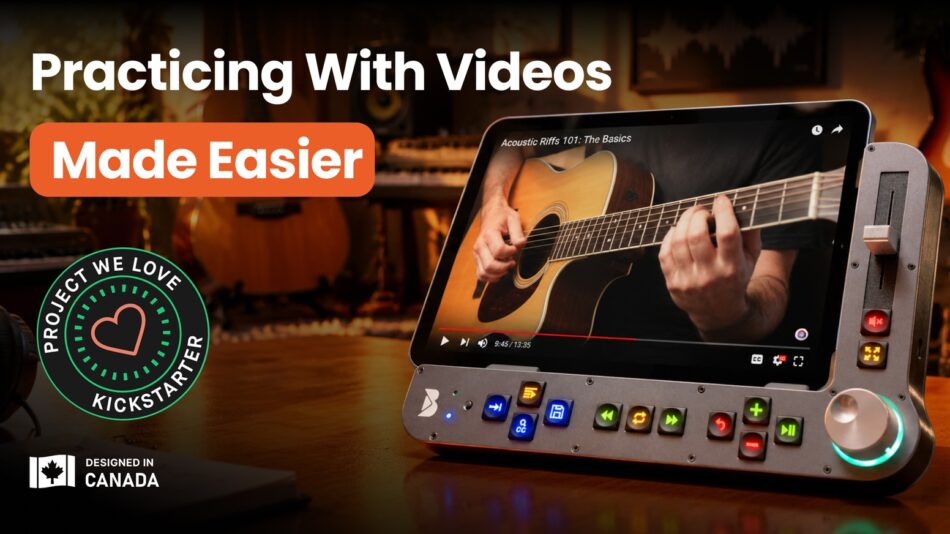
Physical controls for video lessons on iPad and Samsung Android tablets. Loop, rewind and navigate. Less tapping. More practicing.
Check on Kickstarter


🎛️ Meet Benjamin


You sit down to practise, but end up fighting the video. You rewind and miss the spot. You slow it down, but the speed jumps are too big. You want to repeat a few seconds, yet finding the right part takes several tries.
Every interruption breaks your focus and the practice flow.


Benjamin brings the controls you need for video practice into one dedicated surface.
Play or pause, create and refine loops, adjust playback speed in 5% steps, return to saved material, and move through the video by 1, 5, 10 seconds or even frame by frame.
[Benjamin Walkthrough] 👇


Videos have plenty to teach you. But their controls weren't designed for practice.
That's why Benjamin was created.
A tactile control surface that lets you navigate, loop, and slow down video with precision, so you can spend less time controlling the video and more time actually practising and marking progress.
Benjamin Gets a Proper Review. Check It Out 👇
🧩 Complete Practice Setup

Benjamin combines a physical control surface, a built-in adjustable iPad stand, and a dedicated companion app.
Set your iPad or Samsung Android tablet at a comfortable viewing angle, open your lesson in the app, and use the buttons and scroll wheel to control it.


The control surface connects wirelessly via Bluetooth, and you can also mount Benjamin on a standard tripod or VESA-compatible arm to suit your setup.
Everything you need to follow a video lesson and practise with it, brought together in one system.
🔁 Practice Controls & Features


Some passages take more than one try. Benjamin lets you repeat just the section you're working on, without having to find it again after every attempt.


Need to go back a few seconds or find a particular moment in a video? Benjamin's large, tactile scroll wheel gives you precise control with a simple turn.
Press the wheel to choose how far you want to move: 1, 5, or 10 seconds, chapter by chapter, or even frame by frame. Then turn it to move forward or back.
Find the exact part you want to work on without repeatedly dragging the progress bar and missing your place.


Sometimes, slowing a video down by 25% is simply too much. You may only need a small adjustment to follow a difficult passage.
Benjamin gives you precise speed control in 5% steps. Use the dedicated + and − buttons to slow down just enough, then gradually increase the speed as you become more comfortable.
When you want to return to the original speed, one press takes you straight back to 100%.


With the Benjamin app, you can save your videos, name important loops and bookmarks, and organise them into playlists by song, lesson, or technique. That tricky passage you were working on yesterday? You won't have to go looking for it all over again.
Press the dedicated Playlist button to bring up your recent loops and bookmarks, or navigate to the Playlist tab to browse your full collection.
Your practice material stays organised, so it's easy to carry on where you left off.

🎓 Learn from Your Favorite Teachers

Keep learning from the musicians and videos you already follow. Benjamin adds precise navigation, looping, and speed control to help you practise each lesson more effectively.

▶️ How It Works

Benjamin brings a physical control surface, an adjustable tablet stand, and dedicated companion app together in one practice setup.

🎛️ More Controls


📱 Benjamin App

The physical controls are only part of the story. The Benjamin app gives you several ways to make the setup feel right for you.
Adjust the button brightness, switch between light and dark modes, and fine-tune your app settings to suit the way you practise and the space you’re in, from a bright patio to a dim studio.
And one more thing we think you’ll appreciate, there's no subscription fee. The Benjamin app comes with your device, so you can keep using its features without adding another monthly bill.


🖐️ Explore the Buttons

With 13 illuminated buttons, a precision scroll wheel, and a physical volume slider, every control has a clear purpose.


✨ Other Use Cases

Music practice is where Benjamin began. But precise video control can be useful anywhere learning means watching, repeating, slowing down, and trying again.


From the iPad mini to the 13-inch iPad Pro, Benjamin is designed to accommodate a wide range of iPads running iPadOS 16 or later. You can keep your case on, too, provided the combined thickness is no more than 13 mm.


Benjamin starts with YouTube, but it was never meant to stop there.
We built Benjamin around learning from video, not one particular website. Some platforms may be relatively straightforward to support, while others will require more development or direct collaboration.
But our goal is to keep expanding Benjamin across more of the places people learn from video, with broader platform support as an important part of where Benjamin is headed.

🎒 Portable Design

Your practice doesn't have to stay in one place. Benjamin measures just 11 × 7.5 × 2.25 inches and weighs approximately 2.1 lb (950 g).
Take it to a lesson, move between practice spaces, or set it up wherever you prefer.
With a rechargeable battery lasting approximately 9 days at 3 hours of daily use, you can practice without keeping it plugged in. When it's time to recharge, simply connect the USB-C cable.

⚖️ Why Benjamin?


👥 Meet the Team

I'm Robinson Kelly, founder and inventor of Benjamin.
A few years ago, after a life-time of playing drums, I started learning bass guitar using YouTube on my iPad. I'd hear a passage I wanted to try again, drag the video back, and miss the spot. Too far. Forward a little. Still not quite right.
Before I knew it, I was spending more time finding the part than actually playing it.
Having worked as a television video editor, I knew how useful proper physical controls could be. I wanted a button I could press, a wheel I could turn, and a way to repeat a tricky passage without all that fiddling around.
So my wife and co-founder, Ilana, and I decided to build something ourselves.
We started with a simple 11-button prototype. Erik von Harten, our co-founder and an award-winning software developer, later joined us to lead the software development. Together, we've spent years turning that early idea into Benjamin.
What I wanted was quite simple: a way to spend less time managing the video and more time actually learning. That's what we've been working to give you.
We're a Toronto-based team, operating through Benjamin Industries Inc., with design patents granted in Canada and the United States.

Developed by Benjamin Industries Inc. | Toronto, Canada


