
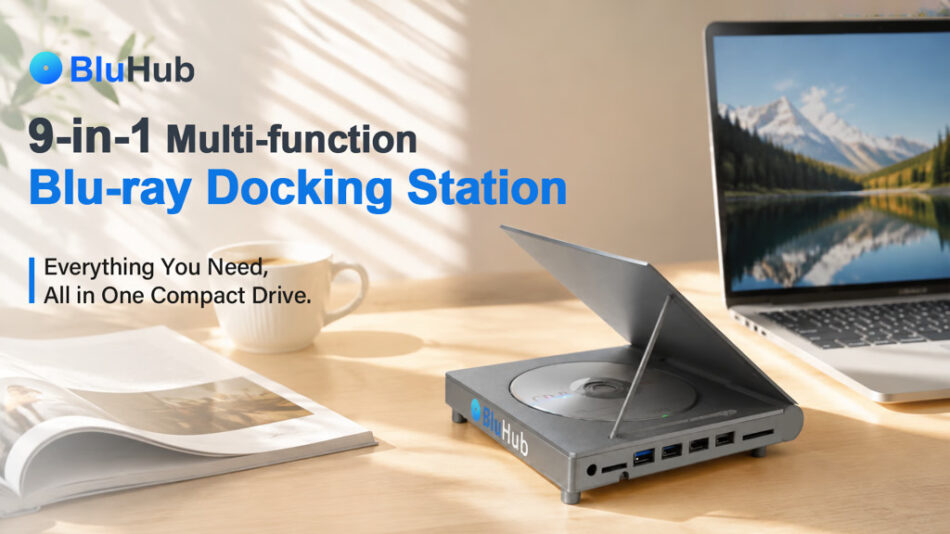
9-in-1 Hub | Blu-ray/DVD/CD Read & Write | Plug & Play | 10Gbps Data Transfer | SD/TF Card Reader | USB-C + USB-A | Grand Piano Design
Check on Kickstarter
Thin laptops drop optical drives, USB-A, and HDMI for portability. But reading old discs or backing up to Blu-ray requires extra hubs and external drives. Desks get cluttered, bags fill with cables—and ‘minimalist lightness’ turns into the hassle of carrying multiple dongles.


When was the last time you opened that drawer of CDs? Discs labeled “Youth,” “Wedding,” “Baby’s First Month” carry a warmth that cloud storage can’t match. BluHub helps you revisit those moments—don’t let changing ports stand in your way.

One BluHub replaces separate devices for optical reading, port expansion, card reading, screen casting, and cables. No more choosing what to bring. Desk stays tidy, bag stays light. Plug in and go.
Thin laptops strip features away; BluHub brings them back. One device does it all.


BluHub combines optical disc reading/writing, port expansion, and data transfer in one device. It supports Blu-ray/DVD/CD reading and burning, 4×USB 3.0 ports, an SD card slot, a TF card slot, and dual USB-C/USB-A connectivity. No need for multiple devices—it handles office work, creative projects, entertainment, and data management with ease.

The housing is made from high-quality aluminum alloy, offering a lightweight yet durable build with a premium feel. It also supports heat dissipation, allowing BluHub to perform reliably while fitting naturally into any modern desktop setup.


Compared to regular storage, Blu-ray discs offer larger capacity and more stable offline preservation. A single BD-R disc supports up to 100GB, easily storing high-res photos, family videos, 4K footage, creative projects, and important files.
It also supports 6× high-speed Blu-ray burning, letting you quickly create backups and preserve valuable digital content for the long term.
Whether revisiting old memories or archiving future materials, BluHub gives your digital assets a safer, more reliable home.

Once connected, open the tray with the physical button or system eject. Press it, the tray slides out smoothly. Insert your disc, push it back, and you’re ready to read or burn.

You can also click “Eject” from your computer’s external drive menu. No complex setup—just quick, easy disc access every time.

BluHub features built-in SD and Micro SD (TF) card slots, so you can read data from various devices without an extra card reader.

With USB 3.2 Gen2 high-speed transfer technology, it supports up to 10Gbps data speeds and works with high-speed memory cards for faster file imports and management.
Whether it’s high-res photos, 4K footage from your camera, or files from drones and mobile devices, transfer is quick and smooth. Tested read speeds reach over 160MB/s, helping photographers, creators, and professionals save time and get more done.


Many treasured photos, family videos, and classic collections are still on old discs. BluHub supports Blu-ray, DVD, and CD reading and burning—so you can revisit past memories and keep important content safe for years.From old family photos to creative projects and key files, BluHub provides a reliable, convenient way to preserve what matters.


Once connected, BluHub is automatically recognized by your system—no extra drivers or complex setup required. Just plug in and start reading, accessing, or burning discs. Powered via USB, it needs no separate power adapter, reducing cable clutter and making it easy to carry for office, home, or on-the-go use.


With built-in USB-C and USB-A cables, BluHub works with both new USB-C devices and older USB-A computers—no extra adapters needed. Simple, convenient connectivity across different devices.


BluHub features a high-quality aluminum body that offers durable protection with a lightweight, premium feel. The refined metal texture and clean, modern design fit naturally into any desktop setup.

Aluminum not only enhances durability but also provides good heat dissipation for stable performance. With its compact design, BluHub combines professional functionality with desktop aesthetics—a digital storage companion built to last.


BluHub works with Windows, macOS, Linux, and Chrome OS—so whether you’re working, creating, or managing files, it connects easily.
It also supports iPadOS and Android OTG devices, including iPad Pro, Android tablets, and phones, for disc reading, photo transfers, and data management across devices. BluHub fits more scenarios without device limitations.


BluHub features a unique grand piano‑style flip‑top structure that blends function with desktop aesthetics. Lift the top cover to store an extra disc while the internal drive reads or burns another independently—offering a “one in use, one on display” dual‑disc experience.

With its sleek look and aluminum build, BluHub is more than a tool—it’s a desktop piece that adds visual and functional value to your digital storage.

At just 165×160×34mm and 409g, it fits easily into your bag, balancing desktop presence with portability.


BluHub features a four‑point anti‑vibration structure and non‑slip pads to reduce movement and during high‑speed disc rotation, providing a more stable base on your desk.

With quiet‑read design, noise is kept low during Blu‑ray, DVD, and CD reading or burning—giving you a calm and steady experience. Whether for daily access, backups, or burning, BluHub delivers reliable, smooth performance.


