
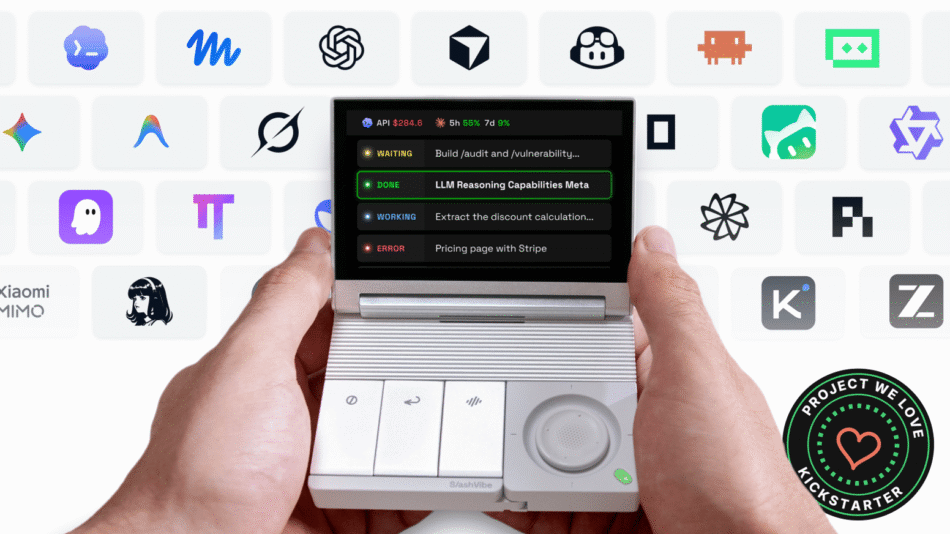
AI agents and tasks in one small workspace. Less window juggling and typing, more getting done. Open source and yours to customize.
Check on Kickstarter
Meet SlashVibe


Why It Stands Out


An AI workspace we can build together.

We’re open-sourcing the software behind SlashVibe to give you more transparency, more control, and more freedom to create.
Privacy you can verify.
See how SlashVibe handles your agent sessions and voice data, including what it shares with external services.
Make SlashVibe your own.
Use it right out of the box, or build your own screens, tools, and agent integrations. Explore what others create and share your own ideas.


Source code will be released under GNU AGPL-3.0 before devices ship. Hardware design files and official backend services are not included.
Some third-party chip firmware may not be released as source code. Those components will be provided as firmware packages with interfaces.
See how it works


Every agent. At a glance.
See all your AI agent sessions on one display. Switch sessions and bring any window to the front. Review and approve agent requests right on SlashVibe.

To-dos that do more.
To-dos are automatically captured as you speak. Tasks get done before you even ask. Add, update, or delegate tasks. Just by speaking.

Meetings, handled.
Flick through smart prompts to catch up, get answers, or ask better questions. Mute or record with a tap. No more searching for buttons. Turn meeting action items into to-dos and agent tasks automatically.
What People Are Saying


A direct line from thought to task

Press the voice key and talk. The close-range mic and physical controls work together, so you can send a prompt to the agent you're working with, or dictate a message or a note.

Ready in under 100 ms
Press the button, and SlashVibe is ready to record in under 100 milliseconds. No awkward pause before you speak, and no wondering if it’s listening yet. It’s a dedicated key, so it won’t clash with shortcuts in your other apps. Just get your thoughts out while they’re fresh.
Clean text, not a raw transcript.
SlashVibe comes with its own voice input software, so you don’t need a separate dictation app. It removes filler words, fixes formatting, and uses your own terms, so what lands on screen reads like you typed it. It can automatically add project names, libraries, and teammates’ names to your personal dictionary, so they’re spelled correctly every time.

Speak quietly. Send when you're ready.
Bring the mic close and speak softly, whether you’re in an open office or working late at night. When you’re done, press Send. Need to change something? Just edit it by voice. Changed your mind? Press Cancel, and nothing gets sent.

Anywhere you'd type.
It’s not just for agents. Use it for prompts, emails, notes, messages, and searches. SlashVibe adjusts the tone for each: precise for prompts, polished for emails, and natural for quick messages. One voice tool for your whole workday.

Multilingual voice input.
Speak in the language you think in. English, Spanish, French, German, Portuguese, Chinese, Japanese, Korean, and more are supported. Accuracy varies by language.
A clear view. A clearer head


Let your agents work in parallel while you stay focused on what’s in front of you. SlashVibe keeps their progress in view on its own display, right beside your main screen, so a glance tells you what’s running, what’s done, and what needs you.
No need to open every conversation just to check. No mental list of things to come back to. Your main screen stays free for your work, with less to keep track of and fewer reasons to lose your train of thought.

Hear it when an agent needs you.
When an agent stops and waits for your input, SlashVibe updates its status on the display and plays a short alert. No more finding out an hour later that it’s been waiting on you. Of course, you can turn off the sound whenever you need to focus without interruptions.
Your next idea. In gadget form


Make SlashVibe your own.
Connect an agent we haven't added yet, or design a dashboard around the way you work. You can also create your own tools for the work you do most. You could even build a tiny garden that grows as your agents finish tasks.
Whatever you build, it becomes part of the device you use every day.

Bring your own agents.
Using a tool that’s not on our list yet? Connect it, then use SlashVibe’s display and controls to interact with it.
Put what matters on screen.
Track API spend against your budget, count down to a deadline, or keep a do-not-disturb timer running while you focus. If it’s worth seeing at a glance, just put it on SlashVibe.

Or just make it fun.
A pixel pet that perks up as tasks get done. A mini game for when your agent is still thinking. We can’t wait to see what you build.
I’m still not sure why one of our engineers decided to play Pokémon on SlashVibe, but he did.
It just feels right


Handheld
Lean back. Stay in control.
Your work still needs your attention. It just doesn't need your hands on the keyboard. With AI agents taking on more of the work and voice input to guide them, you can finally put that expensive ergonomic chair to good use. Detach the controller, lean back, and keep your agents moving.

Quiet voice
Bring it closer to pick up even a whisper.
Talking to your computer in an open office can feel awkward. Bring the controller close and speak softly. It still hears you clearly, and nobody else needs to.
Works with your stack


Why a dedicated controller?


Crafted to impress

Made to earn its place on your desk.

Sandblasted, anodized aluminium
Display housing, base and action keycaps.

Ultra-low-profile switches
Kailh ultra-low-profile mechanical switches
with short, decisive travel.

Soft-touch controller
Soft-touch upper surfaces and joystick cap.

Two finishes
Black or Silver. Choose your color after the campaign via survey.

Rewards


Add-ons


Specifications


What's in the Box


Your data stays yours


From concept to your desk


Meet the Team


