
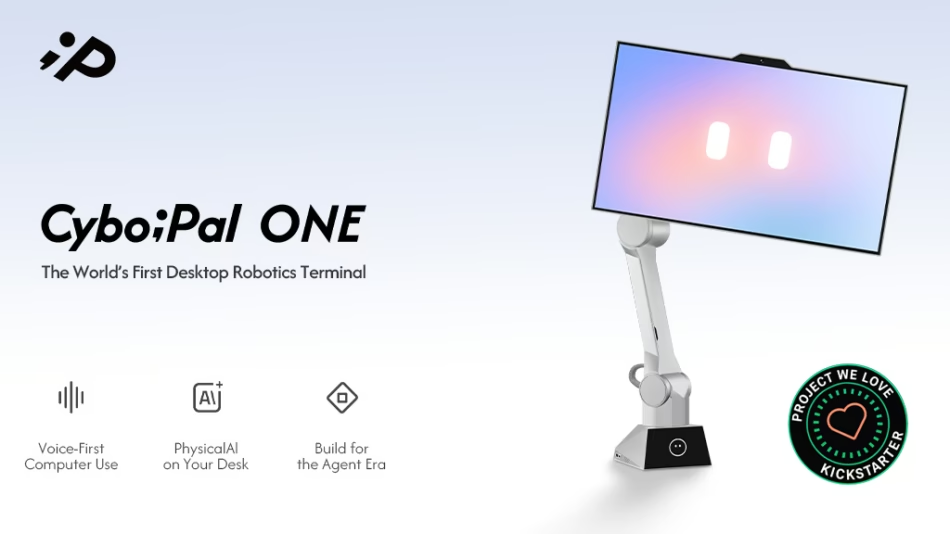
Adaptive Ergonomics | Voice & Gesture Interaction | Dedicated Client & Pauli Agent | 6-Axis Movement | 27″ 4K Display | Visible Privacy
Check on Kickstarter
Computers Got Smarter. The Way We Use Them Didn’t.
Meet CyboPal ONE—the Desktop Robotic Terminal that brings your computer to life.
CyboPal ONE works with the computer you already use, adding adaptive robotic motion, voice and gesture control, and AI-powered workflows. It moves with you, responds to your voice and gestures, and helps you move between tasks without breaking your flow.

See CyboPal ONE Through Their Eyes.
Hands-On with CyboPal ONE
“A Jarvis-like feeling.” — Andres Vidoza
TechUtopia went hands-on with CyboPal ONE at IFA 2026.
CyboPal founder Dr. Peng demonstrates CyboPal ONE in action and shares his vision for the future of human-computer interaction.
In the Press

Pioneer Features

Your Slouch Isn’t the Problem. Your Static Workspace Is.
Sit upright to focus, stand to stretch, or lean back to read—CyboPal ONE keeps what you’re viewing at an angle that feels right for you. Settle into a comfortable position and let the display stay there, or have it adjust with you as you move.

Voice, Built Into Your Workflow.
Pauli, the AI Agent built into the dedicated CyboPal Client, turns your spoken requests into actions. Ask CyboPal to adjust its position, control supported apps, or write and refine text in the active text field—all without interrupting your flow.
Move CyboPal by Voice
Tell CyboPal to come closer, move farther away, rotate to a new angle, or switch to portrait mode. You can also recall a saved position, adjust brightness, or enter Privacy Mode—all by voice.
Need a closer view of a document or a better angle for vertical content? Just say what you need and CyboPal responds.

Speak to Open, Arrange, and Control Apps
Ask CyboPal to open an app, arrange your windows, switch tabs, search the web, or control playback. For a study session, ask it to open a YouTube tutorial on the left and a notes app on the right, then adjust the split and control playback as you follow along.

Speak to Write, Refine, and Send
Dictate a Slack reply or email directly into the field you’re using. Then ask CyboPal to make it clearer, shorter, or better match the tone you want. Review the result and send it when you’re ready.

Say What You Need. Pauli Routes the Work.
Pauli is the agent built into the dedicated CyboPal Client. It interprets your request and routes each task to the appropriate supported app, AI assistant, or coding agent—including Gmail, Slack, Chrome, Zoom, YouTube, Gemini, ChatGPT, Claude Code, and Codex.

Pauli keeps task status visible while you keep working. When a result is ready—or your approval is needed—it brings you back to the right session so you can review the result and decide what happens next.
Gestures. Another Natural Way to Take Control.
CyboPal ONE responds to hand gestures, so you can move it and navigate content when the mouse and keyboard are out of reach.

Use gestures to activate tracking, bring CyboPal closer or farther away, and rotate it. A firm tap on the desk stops movement immediately, while an in-air swipe scrolls through content.

Made to Move in Your Real Workspace.
Real desks are filled with laptops, notes, and everyday objects. CyboPal uses 3D spatial sensing to detect its surroundings and move within preset boundaries.
If external power is lost, backup power enables a controlled descent, helping protect the system during an unexpected outage.

Privacy, Protected in Two Ways.
Local by Design
Powered by the RK3588 platform with an 8-core ARM CPU and 6 TOPS NPU, CyboPal processes movement, gesture, and spatial data locally—not in the cloud—keeping those inputs local and your workspace under your control.

Privacy Mode, Under Your Control
Privacy Mode physically cuts power to the cameras and microphones. When the red status light turns off, sensing is off. Use the physical Mode button or the CyboPal Client to turn Privacy Mode on or off.

Works With the Devices You Already Use.
CyboPal supports Windows, macOS, and Linux with a dedicated CyboPal Client for each platform. Connect your computer via USB-C to unlock voice control, robotic motion, and the full range of interactive features.
Compatible phones and tablets can also connect via USB-C or HDMI 2.1, bringing their content to CyboPal’s 27″ 4K display.

You Back It. We Unlock More.
First 1,000 Backers — Complimentary Freestanding Desk Mount
The first 1,000 CyboPal ONE backers will receive a complimentary Freestanding Desk Mount. It provides a clamp-free setup without requiring access to the back edge of your desk.

US$2M Unlock — Obsidian Black
If the campaign reaches US$2 million, Obsidian Black will be unlocked as an additional finish at no extra cost. You won’t need to change your pledge—you’ll be able to choose your preferred finish in the post-campaign survey.

US$3M Unlock — CyboPal ONE Developer Edition
At US$3 million on Kickstarter, we’ll unlock the Developer Edition—built for creating new experiences on CyboPal.
Developer APIs will let your apps, AI agents, games, and creative tools access CyboPal’s voice interaction, visual input, screen content, device state, and safe motion control. Create custom tools, skills, and plugins that combine software actions with CyboPal’s display, perception, and movement. Featuring special commemorative design details, the Developer Edition will celebrate this milestone and the community of builders bringing these new possibilities to life. Bring your code, your curiosity, and the ideas you’ve always wanted to try.

Out of the Lab. Into the World.
CyboPal ONE has been demonstrated live at CES, AWE, and IFA—moving, responding, and adapting in front of real audiences. What began as an engineering question is now real, working hardware people can see and experience for themselves.

What’s in the Box?

Shipping Made Simple.
Shipping is included for the contiguous United States. For other supported destinations, shipping is US$50 per CyboPal ONE, collected with your pledge. CyboPal covers import duties and applicable taxes for supported destinations.

Only selected destinations are shown. The same shipping rates and tax coverage apply to other supported destinations within each region.
Backed From Day One.

Mass Production Is Underway.
CyboPal ONE has moved from working prototypes into mass production. Units for the first delivery batches are now moving through assembly, calibration, and final system testing.
Our production teams check robotic movement, sensing, electronics, connectivity, and finish. Every CyboPal ONE must pass these checks before it is cleared to ship. We’ll continue sharing real production footage and batch progress as manufacturing moves forward.

Built by 100+ Engineers Across Robotics, AI, Hardware, and Software.
CyboPal ONE is the work of an engineering team of 100+ people spanning robotics, AI, embedded systems, mechanical engineering, software, product, and manufacturing. The team includes 10+ PhDs across multiple disciplines, alongside engineers experienced in bringing complex hardware and software products from development into production.
A Desktop Robotic Terminal demands all of those disciplines at once. It must move precisely, understand intent, remain stable and safe in everyday use, and fit naturally into the flow of work. CyboPal ONE brings them together in one system, turning complex engineering into an experience that feels simple and responsive.
We’re building for people who care about performance, thoughtful design, and a more capable workspace. The technology is sophisticated; using it shouldn’t feel that way.
Project Timeline


