
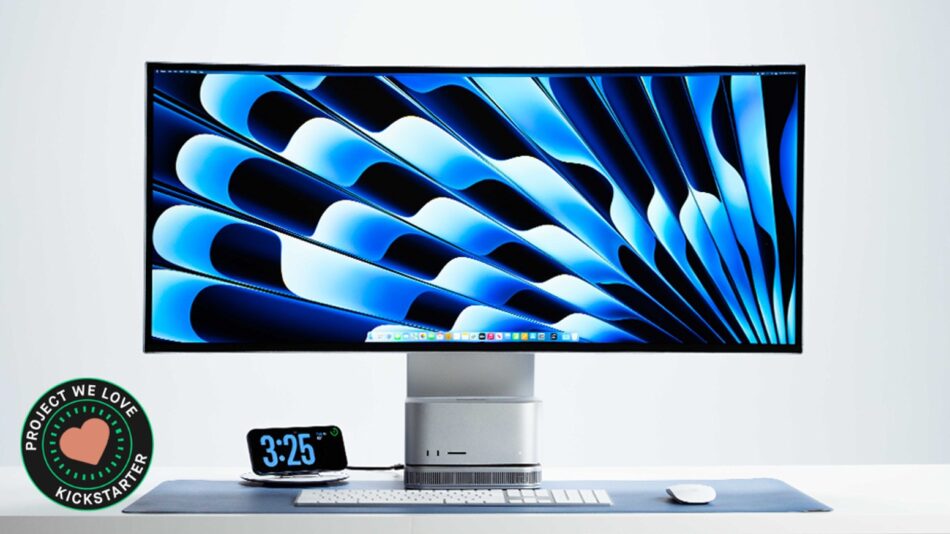
A 40″ curved 5K display, a docking station, an SSD bay, a USB hub, and a charging pad, all built directly into the display.
Check on Kickstarter


Most premium monitors stop at the screen. Prisma starts there.
Prisma takes the tools you normally plug into your monitor and builds them into the display itself. Connect your computer and get more space without filling your desk with docks, hubs, drives, chargers, and cables.

Designed with native docking for Mac Studio and Mac mini, Prisma is compatible with MacBooks, Windows laptops, PCs, and other computers through standard display connectivity. Your computer does not need to be a Mac to get the complete Prisma experience.


A modern laptop, Mac mini, Mac Studio, or PC is only one part of a complete workstation. Adding the display, dock, USB hub, external SSD enclosure, card reader, phone charger, and other essentials can quickly turn a streamlined setup into a cluttered collection of accessories.

All those extra devices take up space, add more cables, and give you more things to plug in, unplug, and troubleshoot. Plus, most monitors only add another screen.

Prisma brings the screen and many of your most-used workstation tools together in one clean, integrated setup.


Prisma combines a 40-inch curved display with the tools you normally keep around your monitor. Instead of adding accessories around your monitor, the tools you use most are built directly into it.


Connect your computer, add your devices, store files, charge your phone, and even switch between two computers, all while keeping cables out of sight. The result is fewer devices to buy, fewer cables to manage, and more room to focus.


Prisma may look right at home beside Apple hardware, but it was built to work beyond a single ecosystem.

Connect a MacBook, Windows laptop, Mac mini, Mac Studio, or desktop PC and get the same expansive 5K2K canvas, integrated hub, storage expansion, card readers, charging pad, and cable-management benefits.


• Works with Mac and Windows
• Supports laptops and desktops
• Standard display connectivity for broad computer compatibility
• Mac mini + Mac Studio fit into Prisma’s built-in cradle
• Picture-by-Picture and KVM workflows for users with two computers


Most monitors give you a screen, but to build the rest of your workstation, you still need to buy docks, hubs, storage, chargers, card readers, switches, and cable organizers.
Prisma puts those tools into one product.

The result is not simply a bigger screen. It is a cleaner, more capable workstation with fewer separate purchases, fewer compatibility headaches, and fewer things competing for space on your desk.

Early Prisma backers get the complete workstation at a special Kickstarter price.


Prisma gives demanding workflows the space and clarity they deserve. The 40-inch curved 5K2K panel delivers the width of a dual-monitor setup without dividing your work in half.
Keep timelines, toolbars, reference files, dashboards, chats, and live previews visible at once. Quasi 10-bit color and 99% DCI-P3 coverage support creative work, while a 120Hz refresh rate keeps movement smooth throughout the day.
• 40-Inch Curved 5K2K Ultrawide Display
• 5120 × 2160 Resolution
• LG IPS Black Panel
• Quasi 10-Bit Color with 1.07 Billion Colors
• 99% DCI-P3 Color Coverage
• 120Hz Refresh Rate


Stop reaching behind your computer or dangling another adapter from the side of your laptop. Prisma keeps everyday connectivity inside the workstation centerpiece.
Connect peripherals through the integrated USB hub, transfer files with SD and microSD readers, and keep the tools you use most within easy reach.

• Integrated USB-C, USB-A, and USB-B Connectivity
• SD and microSD Card Readers
• Built-In Workstation Docking
• KVM Support for Shared Peripherals Across Two Systems
• Active Cooling Fan


Prisma has a built-in M.2 SSD slot, so you can add fast storage without adding another drive or enclosure to your desk.

Store large videos, photos, designs, projects, and files right inside your Prisma setup.


Prisma’s built-in KVM switch and Picture-by-Picture support make a two-computer workflow feel like one cohesive workstation.

Run a work laptop and personal desktop side by side. Compare Mac and PC builds. Monitor one system while actively working in another. Then control both with the same keyboard and mouse without adding a separate switch box.


Mac mini and Mac Studio can sit directly inside Prisma’s built-in cradle. That keeps your computer off the desk while making ports and controls easier to reach.

Prisma also includes adaptive cooling that responds to temperature when extra airflow is needed.


Prisma keeps power where you need it. USB-C power delivery supports compatible laptop workflows, while the integrated 15W wireless charging pad gives your phone a dedicated place to recharge without adding another cable across the desk.

Your devices stay ready. Your workspace stays intentional.


Prisma’s integrated Continuity Camera mount places a compatible iPhone at the top of the display for a cleaner video-call setup with Center Stage and Desk View support.
No extra clamp. No separate webcam. No cable hanging down the front of the monitor. When the call ends, the mount folds away.


A workstation should connect your tools without turning your desk into a wiring project.
Prisma brings the ports, storage, and charging you rely on into the display itself, reducing the need for loose hubs, external enclosures, and chargers scattered across the desktop.
Thoughtful routing keeps the connections accessible while helping cables disappear from view.


For compatible laptops, a streamlined USB-C workflow connects the computer to the display and workstation hub. Desktop systems connect through Prisma's standard display and data inputs while still benefiting from integrated expansion and a cleaner setup.


Mobile Pixels has returned to crowdfunding again and again for one reason: this community helps turn ambitious workspace ideas into real products used around the world. From the original DUEX to TRIO, Geminos, and the latest generation of portable displays, every campaign has helped us learn, improve, manufacture, and deliver at scale.

Prisma is our boldest workstation product yet, built on years of display engineering and real feedback from the people who backed us first.


Hi, I'm Jack, founder of Mobile Pixels.
Prisma started with a frustration I dealt with every day. My Mac Studio was tucked under a monitor riser, the ports were difficult to reach, the power button was hidden at the back, and every attempt to expand storage or connectivity added another accessory and another cable to my desk.
I wanted one product that respected the power and design of the computer at the center of my setup, without forcing the rest of the workstation to become a patchwork of third-party boxes.
That idea became Prisma: a professional display that does more than show your work. It organizes, expands, connects, charges, and simplifies the entire space around it.
Our team has successfully brought multiple display products to life through crowdfunding. With your support, we cannot wait to bring Prisma to desks around the world.
– Jack


