
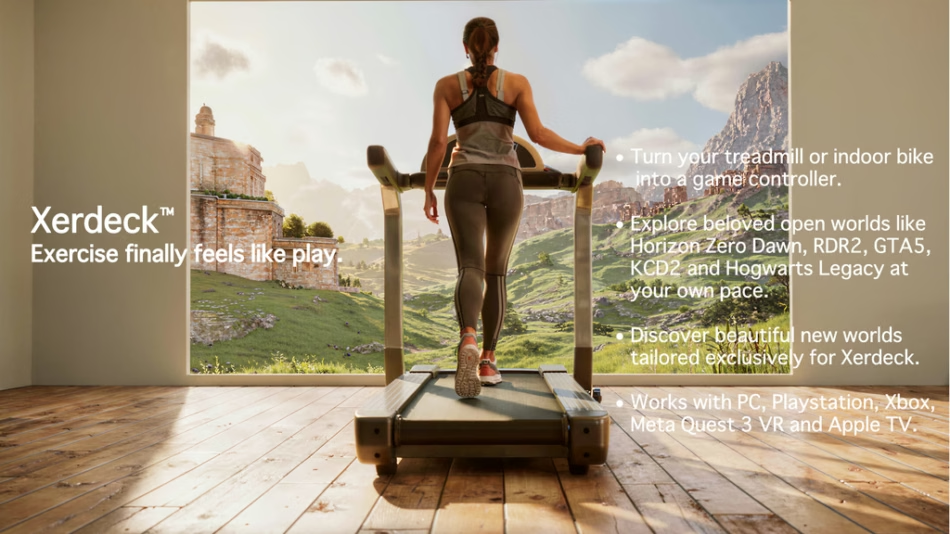
Pair a Bluetooth treadmill or indoor bike to Xerdeck and control games on PC, PlayStation, Xbox, Quest 3 and AppleTV
Check on Kickstarter
We’ve always loved video games, and how it feels to be inside those beautiful game worlds. It started with playing Tomb Raider on PC for the first time in 1996 in “high resolution” 640×480 mode, and then replaying it on a 3dfx Voodoo card in glorious 3D. Adventure and discovery were the core of this incredible game world, and we experienced many hours of pure joy in playing it.

Games have come a long way since that time. Every generation of PC and console gaming has brought even better graphics, and we are now at a time that the realism of game rendering is approaching the point where it feels real. It’s a great time to be a gamer.
Xerdeck grew out of a desire to bridge the best aspects of video gaming with getting regular exercise. Rather than just moving a character around the screen by moving your fingers around a game controller, what if we could be the character on the screen and travel in those beautiful worlds on a treadmill or bike and get exercise whilst we explored?
Keeping fit and healthy is important, particularly as we get older, but exercising regularly is often not much fun. Xerdeck changes that. It makes exercising engaging and enjoyable by enabling players to immerse themselves in a game world. For gaming nerds like us, building Xerdeck has been a passion project which we’ve wanted to do for years. We quickly realized there are also a lot of non-gamers who never discovered the wonderful world of gaming, and how it can add a fun new dimension to their daily exercise routine.
Xerdeck is designed for exercise enjoyment, so has a joystick for looking around, as well as buttons for simple actions, such as jumping (for getting over any logs and small rocks which block your path in a game). It’s not intended for intense games like first-person shooters, or games that require lots of interaction with complex control systems. That makes it perfect for non-gamers as well, who want things to be simple to use.

About us
The developer of Xerdeck, Lava Software, is a hardware and software development company founded in 1997 by Michael Wildoer. Over that time, we have created a range of hardware and software products for consumers and businesses.
Michael Wildoer (CEO and lead developer) is a digital electronic design engineer who started out designing 68k and Z80 computer boards in the late 1980s, and most recently worked at Analog Devices, Inc. (ranked #396 on the Fortune 500 list) on their latest EV technology. He has extensive experience with microcontroller hardware design and production, embedded software development, IoT and desktop software development. You can see my full background on LinkedIn.
Alicia is currently in the backroom doing testing and support, and will be managing provisioning and fulfillment after the campaign ends. She will also be developing content for the Xerdeck landscape library (beautiful new worlds tailored exclusively for Xerdeck).
What is the Xerdeck platform?
Xerdeck combines existing PC technology and game consoles with fitness machines like treadmills, indoor bicycles and rowing machines. It works best with new low-cost Bluetooth enabled fitness machines, but can also work with older fitness machines without Bluetooth. For example, sticking a $20 Bluetooth cadence sensor on the pedal crank of an old exercise bike will get you going.
There are four hardware units in the Xerdeck system:
● Xerdeck
The core of the platform. It’s the central hub which mounts on the fitness machine and connects to Bluetooth peripherals like fitness machines, cadence sensors, heart rate monitors and fingertip oximeters (heart rate and blood oxygen). It also has separate USB-C connections for a computer data link, a game control link, and a PS4 controller emulator link (with the optional PS4_CE cap).


● Single-Handed Controller
This works via a wireless Bluetooth serial link to the Xerdeck, so information can be sent and received. It sits comfortably in your hand as you exercise, making it a great way to control the action. It also lets a second person — a family member, carer or personal trainer — steer on behalf of someone with limited hand dexterity, opening the platform to elderly or disabled users. The SHC is a Bluetooth peripheral which can emulate a keyboard, mouse or gamepad. This enables it to control games on PCs and media boxes, such as the Apple TV and Android TV.
Makers can also use the 8-pin expansion connector inside the SHC to add functionality such as extra buttons, a gyro/accelerometer, compass chip, gesture recognition, step counter, or voice recognition.

● PS4_CE cap
The PS4 Controller Emulator cap plugs into the nRF 8-pin expansion connector inside the Xerdeck, and enables you to then map the Xerdeck (or SHC) controls to PS4 controller buttons and joysticks using the Xerdeck desktop app. You then plug a USB-C cable into the cap and the other end into your PlayStation 4 game console or PC (many games on PC support a PS4 controller natively). It’s a great way to give your old PlayStation 4 a new life!
● RP2040 maker cap
This cap plugs into both the nRF and Pico 8-pin expansion connectors inside the Xerdeck, and enables makers to load up CircuitPython or Arduino code to extend the capabilities of Xerdeck. Add extra buttons, rotary encoders, sliders, dials, toggle switches and other custom controls. Also, makers can build peripherals such as motorized inclination controllers for treadmills and bikes, a winder motor for adjusting resistance on a manual resistance bike, tiller steering, variable speed fan control, hand gesture recognition, camera-based step counters, and retrofit treadmill rotation speed sensors.
Xerdeck project history
We started full-time development work on Xerdeck around January 2024, and started assembling the first pre-production prototypes of the Xerdeck and SHC units in early 2026. It’s taken quite some time to develop and test the various parts which make up the system, with Bluetooth being one of the most complex.
Here are some pictures of the first pre-production Xerdeck unit, and the prototype SHC. You can probably tell we had lots of orange 3D printer filament for the first cases.


The prototype below has a near production ready PCB (3rd generation design) inside a rough 3D printed case. The case will be redesigned to greatly improve it’s aesthetics and make it ready for volume production. We are aiming for a beautiful injection molded case for production, so help us hit our stretch goal, and it will happen!

Demonstration of an exercise session
This setup uses a PS4 to run the game, and a MacBook Air to setup and run the exercise session. This is an unedited, single-take video.
The movie starts by showing the Xerdeck desktop app. We press a button to open the wired data link (which collects data from the Xerdeck and stores it on the computer), and the other button to connect the Bluetooth devices: a treadmill and a fingertip oximeter. Then we flip to the Start exercising tab, where we select The Division (PS4) game profile, and the Charlotte player profile. Pressing the Play button then starts the exercise session, displaying the live data feed, including heart rate and blood oxygen.
Next we start the treadmill, and use the Treadmill’s Plus speed button to increase the speed from 1.0kph (the minimum speed of the treadmill, and the speed at which the character on screen is stationary). Increasing to 1.5kph starts the character moving. We then use the joystick to control the character’s direction around the van. After getting out to a clearer area, we increase speed to 4.5kph, which causes the character to run. We then decrease speed back to 1.0kph at the end using the Treadmill’s Minus speed button.

The photo shows the wiring of the 3 USB-C cables more clearly: a PS4 game control cable (connecting the Xerdeck’s PS4_CE cap into the black PS4 under the laptop), the computer data link (plugged into the MacBook Air USB hub), and a diagnostic cable (not normally used during play).
There are setups to suit almost any gaming space, as shown below:


Developers can build on Xerdeck
Xerdeck is a great platform for people wanting to exercise, but we also wanted creators to build on it and be able to sell their creations: Unreal Engine and UEFN devs, landscape designers, indie developers, electronics makers, firmware developers, music composers, soundscape designers, VR game developers and others. A developer Discord channel will be open to all Xerdeck pledgers, and we plan to regularly release YouTube videos on all aspects of development for Xerdeck.
What games will work with Xerdeck?
Pretty much everything that has either a USB connector or a Bluetooth 5 chip. Xerdeck emulates a standard wired USB keyboard and mouse, and the PS4_CE cap emulates a PS4 controller. On the Bluetooth side, the SHC acts as a Bluetooth peripheral, and can connect to almost any device which accepts Bluetooth 5 connections as a keyboard, mouse or gamepad, including some VR headsets.

For games specifically developed for Xerdeck, developers will get even more control. For example, on the Apple TV, only Bluetooth keyboard input (no mouse or generic gamepad support) is allowed by Apple for games (it does support MFi certified devices and branded game controllers). This means that an Xerdeck-capable game developed for the Apple TV might need to use the 0-9 keyboard keys as input for treadmill speed control. Even though (for generic devices) there is only keyboard input, innovative control schemes can be used to provide a solid control interface for Xerdeck.
Enjoy an expanding landscape library
A landscape library for Xerdeck (on PC, and later on other platforms) with a beautiful collection of landscapes, historical locations and tourist destinations will be released and regularly updated after the Kickstarter campaign. This content will be tailored for Xerdeck, and enhance your workouts in the future. It is planned that landscapes will be available as stand-alone purchases, or via monthly or annual subscription.

A Founders Lifetime Subscription to this landscape library will be a selectable option in the post-campaign survey (for AU$269), but we plan to include this subscription free to all pledgers if we hit the $1m stretch goal. Tell all your friends and relatives about Xerdeck, so we can reach that goal!
Will Xerdeck work with VR headsets?
Yes. Xerdeck is very flexible and will work with virtually any PCVR headset, like the Meta Quest 3S, Steam Frame, Pimax Dream Air, Varjo XR-4 and PlayStation VR2 (on PC). The demo video below shows a player walking around Way of the Hunter on PC using a Meta Quest 3S headset.
Some VR headsets enable the connection of Bluetooth gamepads and other HID devices. For example, Meta Quest headsets (including the Quest 3 and Quest 3S) as well as the newer Steam Frame support standard Bluetooth gamepads, mice, keyboards, and audio devices via general Bluetooth pairing. That means that VR game developers can interface to these control devices in their game (enabling Xerdeck input), if they wish to implement that.
Stretch goals
AU$200,000 — Injection-molded cases. Instead of resin printing, we’ll switch to injection molding for every Xerdeck and SHC — smoother finish, tighter tolerances, and better quality straight out of the box.
AU$500,000 — Clear black colorway option. Both Xerdeck and SHC get a clear black finish alongside the standard colors, so you can see the electronics working inside. If you grew up with clear-shelled consoles and controllers back in the day, you’ll know exactly the vibe we’re going for.
AU$1,000,000 — Founders Lifetime Subscription, on us. Every single pledger — whether you backed us on day one or the last day of the campaign — gets a free lifetime subscription to the landscape library bundled into your reward (a AU$269 value). No catch, no extra charge.
Which bundle is best for me?
The table below shows the recommended item bundle for each type of gamer setup. This provides the most flexibility for each platform.

Open source
Xerdeck will be mostly open source, under the highly permissive MIT license. This includes the CircuitPython source code on the Xerdeck and SHC units, the 3D printable case, mounting bracket (strap on, or magnetic quick-connect) and thumbstick cap designs, the Xercomm protocol source code (in CircuitPython and Arduino), and other elements of the system. The PS4_CE cap code is GPL 3.0 licensed.
A developer Discord channel will be open to all Xerdeck pledgers, and we plan to regularly release YouTube videos on all aspects of using and developing for Xerdeck. The Xerdeck Substack will provide a product knowledge base and documentation hub for everyone, and will be used to store and organize all product information.
The Xerdeck desktop app enables users to start and log exercise sessions, map controls, create and share game profiles, set up FTMS parsing profiles, use diagnostic and developer tools, and other features. This app will be closed source. iOS and Android versions of the app are planned.

Acknowledgements
Xerdeck is an independent hardware accessory and is not affiliated with, sponsored by, or endorsed by Sony Interactive Entertainment.
“Xerdeck” is a Trademark of Lava Software Pty Ltd.
“PlayStation” is a registered trademark of Sony Interactive Entertainment.
All other trademarks, game titles, and platform names are the property of their respective owners. Xerdeck is not affiliated with, sponsored by, or endorsed by any of the games or platform holders referenced.
Budget
Our AU$20,800 funding goal breaks down like this: AU$8,453 goes toward manufacturing the first production run of Xerdeck and SHC units, and AU$8,000 is set aside for the EMC/FCC/CE(RED) compliance testing every unit needs before it can legally ship. Packaging and shipping materials add another AU$400. There’s no line item for labor — this has been a genuine passion project, and we’re not paying ourselves out of your pledges. The rest of the goal covers Kickstarter and payment processing fees, a small tax buffer, and a margin of error to absorb the surprises that come with manufacturing hardware. If the compliance testing ends up costing more than the AU$8,000 we’ve budgeted, that’s on me — I’d rather keep this goal realistic than pad it against a cost we can’t pin down exactly yet.
What’s your plan, and schedule?
All the heavy engineering and development work has been done. The main tasks now are cosmetic – updating the user interface, GUI controls, product cases, etc. from the raw utility required for engineering and testing, and making them into a consumer product which people will find aesthetically pleasing and enjoy. We’re also refining and simplifying the functionality, and doing lots of testing of the hardware running with a multitude of different games on PCs and consoles.
We plan to start shipping the first orders in February 2027, and ship according to backer number, where possible.


